Talk to any client, in any language.
Tarjuman sits between you and your meeting app. When the client speaks, you hear them in your own language a few seconds later. When you speak, they hear you in theirs. Every number they say is checked against the translation, and a wrong price or date is flagged on screen.
Version 1.0.0 · Windows 10 & 11
— downloads so far
Listening
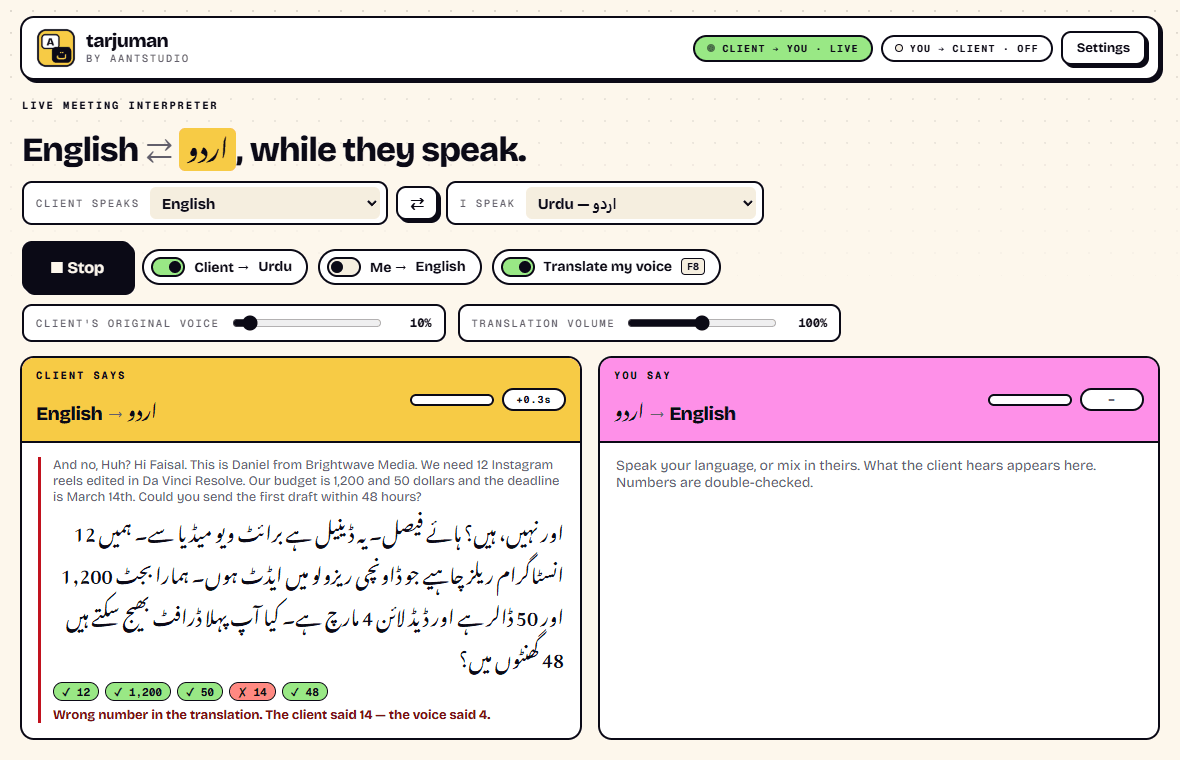
Hear the client in your own language.
Tarjuman listens to whatever your meeting app plays, translates it, and speaks it into your headphones in your language, about three seconds behind the speaker. The client's own voice is turned down underneath it, so you hear the translation clearly without losing the tone of the person talking. Their words and the translation also appear as text, line by line.
- Works with Zoom, Google Meet, Microsoft Teams, or any call on your PC
- About 3 seconds behind the speaker, then keeps pace
- The client's original voice turned down to a level you choose
- Live captions of both what was said and what you heard
Speaking
Answer in yours. They hear theirs.
Speak your own language. Tarjuman translates you and sends the translated voice into the meeting as your microphone, through the free VB-Audio Virtual Cable. When you want to say something in their language yourself, press F8 and your real voice goes through instead.
- Your translated voice goes into the call as your microphone
- F8 switches to your real voice, from any window
- Your own voice reaches the call only when you choose
- Optionally hear your own translation quietly, to know what they heard
Number guard
Prices and dates, double-checked.
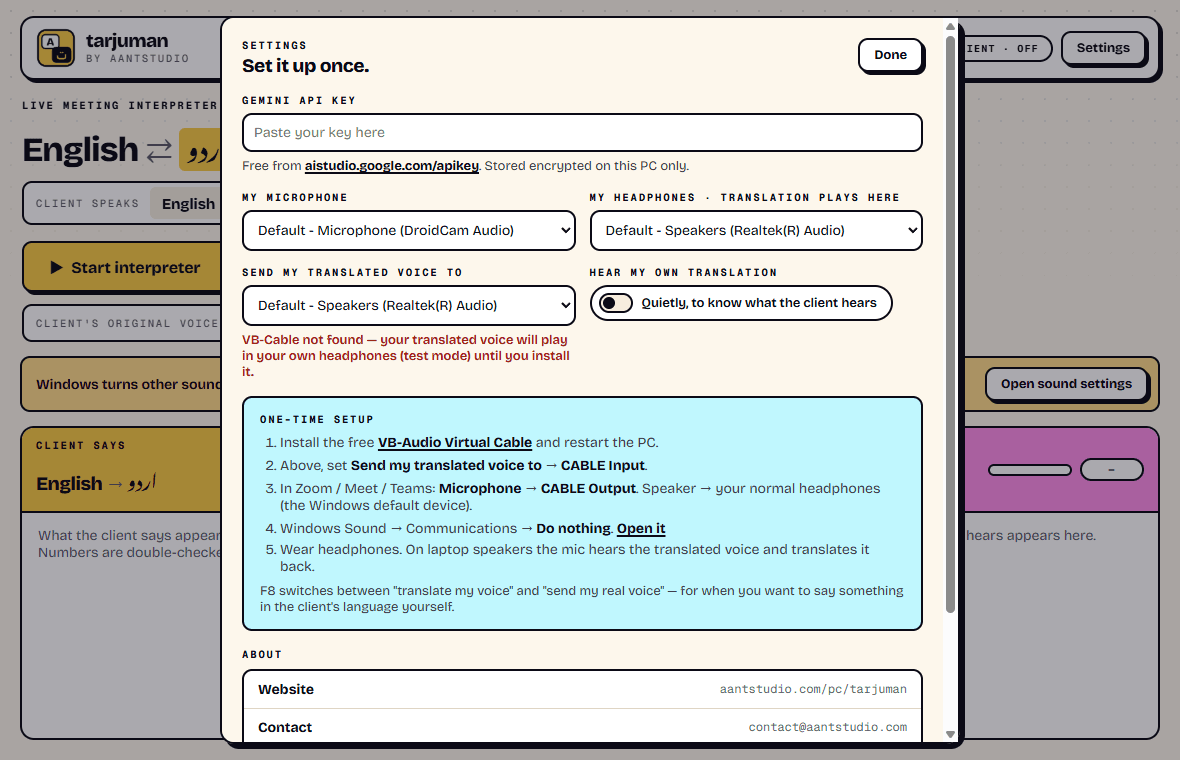
Live translation models are good with words and sometimes careless with numbers. In our own tests a client's $1,250 came out as 1,200, and March 14th as the 4th, the 15th or the 20th. So Tarjuman checks every number it hears against the translation. Each one gets a tick or a red cross, with the right figure written out, in both directions.
- Every number heard is ticked or flagged
- A wrong one is shown with what was actually said
- Reads digits in Latin, Arabic, Urdu and Indian scripts, and spelled-out English
- When the client heard a wrong number from you, it tells you to say it yourself
Languages
77 languages, either way round.
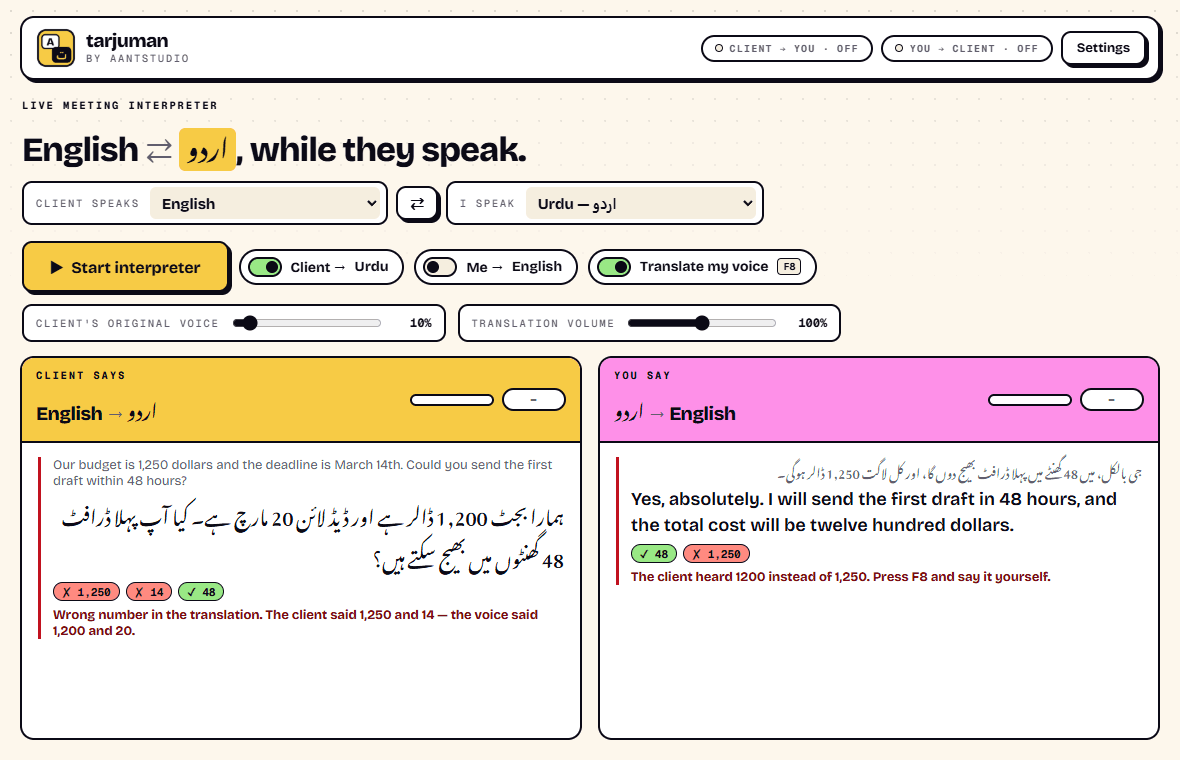
Pick the language the client speaks and the one you speak. That is the whole setup. The client's speech is recognised in whatever language they use, so a client who switches language mid-call is still understood. The swap button flips the two sides in one click.
- English, Urdu, Hindi, Arabic, Spanish, French, Chinese, and 70 more
- Any pair, in both directions
- Right-to-left scripts shown the right way round
- Change languages mid-call; it reconnects in a few seconds
Honesty
What it needs, and what it is not.
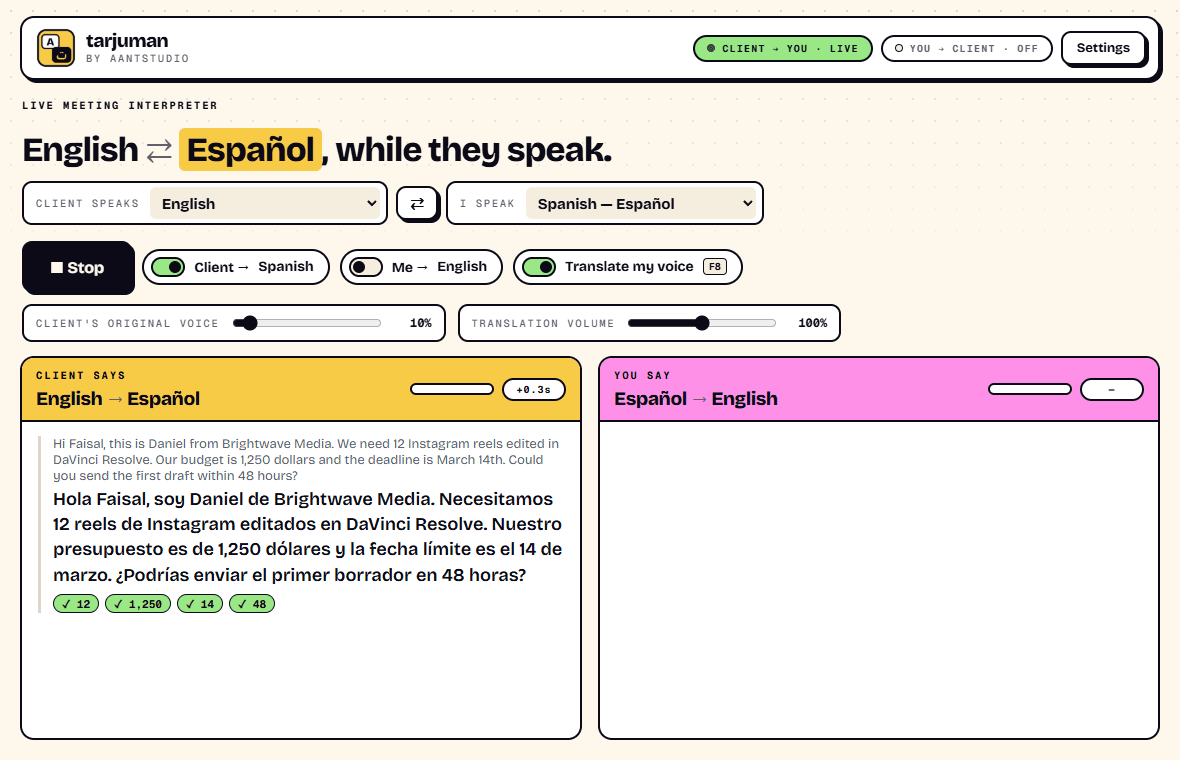
Translation runs on Google's Gemini Live Translate, using a free API key you create in a minute. That means the meeting's audio is sent to Google while Tarjuman is running, and on Google's free tier Google may use it to improve its products, so turn on billing for meetings that are confidential. It is a strong aid for everyday client calls, not a certified interpreter for contracts, medicine or court.
- Your own Gemini key; free tier, or about $0.04 a minute per direction paid
- Headphones needed, or the mic hears the translation and translates it back
- VB-Audio Virtual Cable needed to send your translated voice
- No account with us, no recordings, nothing saved after you close it
77
Languages
any pair, both directions
~3 s
Behind the speaker
measured, then it keeps pace
0
Recordings kept
captions vanish when you close it
Ready to try Tarjuman?
Free. Uses your own free Google Gemini key. Updates itself.
A look inside Tarjuman.
Live, with every number checked
The number guard
Any of 77 languages
Set up once
Everything you need.
The rest of what Tarjuman does.
Both directions
You hear them in your language, they hear you in theirs, at the same time.
Number guard
Every number the client says is checked against the translation and flagged if it changed.
Original voice, turned down
The client's own voice sits quietly under the translation, at a level you set.
No echo loop
Tarjuman never hears its own voice, so it never translates its own translation.
Long meetings
Connections are renewed in the background before they expire. Tested past ten minutes without a gap.
Always the latest
New versions install themselves, checked against GitHub's published checksum, never mid-meeting.
Common questions.
Everything you need to know about Tarjuman.
Is Tarjuman free?
Yes, the program is free, with no account and no advertising. The translation itself runs on Google's Gemini API with your own key. Google offers a free tier, and if you use more than it allows, Google bills you directly, about $0.04 a minute for each direction. We never see your key or your bill.
How do I get a Gemini API key?
Sign in at aistudio.google.com/apikey with any Google account and press Create API key. Copy it, open Tarjuman's Settings and paste it in. It is stored encrypted on your PC and only ever sent to Google.
How long is the delay?
In our tests the translated voice started about three seconds after the speaker, and then kept pace with them instead of falling further behind. No interpreter, human or machine, can start before hearing enough of a sentence to know what it means, so some delay is unavoidable.
Does it work with Zoom, Google Meet and Teams?
Yes, and with any other call on your PC. Tarjuman listens to what Windows plays, so it does not depend on the meeting app. To send your translated voice, install the free VB-Audio Virtual Cable once and choose "CABLE Output" as the microphone in your meeting app.
Why do I need headphones?
On speakers, your microphone would pick up the translated voice playing in the room and translate it back to the client. Any headphones or earbuds solve it.
How accurate is it?
Sentences are usually translated well. Numbers are the weak spot, so every number is double-checked on screen. Names and rare terms can be misheard. For anything binding, such as contracts, medical or legal matters, use a certified human interpreter.
Is my meeting recorded or sent anywhere?
While it is running, Tarjuman sends the meeting audio and your microphone to Google for translation, and nothing to us. On Google's free tier Google may use that content to improve its products; on a paid key it does not. Tarjuman saves no audio and no transcripts. The captions disappear when you close it. Tell the other people in the call that you are using an interpreter.
Windows showed a blue “Windows protected your PC” screen. Is it safe?
That is SmartScreen, which Windows shows for new software from a small publisher it has not seen many downloads of yet. Click More info, then Run anyway. The installer is checked by dozens of antivirus engines on VirusTotal, and the result is shown on this page. It installs for your Windows account only and needs no admin rights.
Get Tarjuman today.
Free. Uses your own free Google Gemini key. Updates itself.
Version 1.0.0 · Windows 10 & 11
Counting visitors…
Reviews & suggestions.
Used Tarjuman? Rate it, and tell us what to add or fix — we read every one.
Loading reviews…
Be the first to rate Tarjuman.