Free VPN for Windows, and it shows its work.
One click to connect. Your real country and your new one sit side by side at the top of the window, so you can see the change instead of trusting a green badge. Beside it: every country that is answering right now, a live speed graph, and the controls a paid client has — kill switch, IPv6 leak blocking, your own DNS and split tunnelling.
Version 1.0.1 · Windows 10 & 11
— downloads so far
Connecting
One click, and you can see it working.
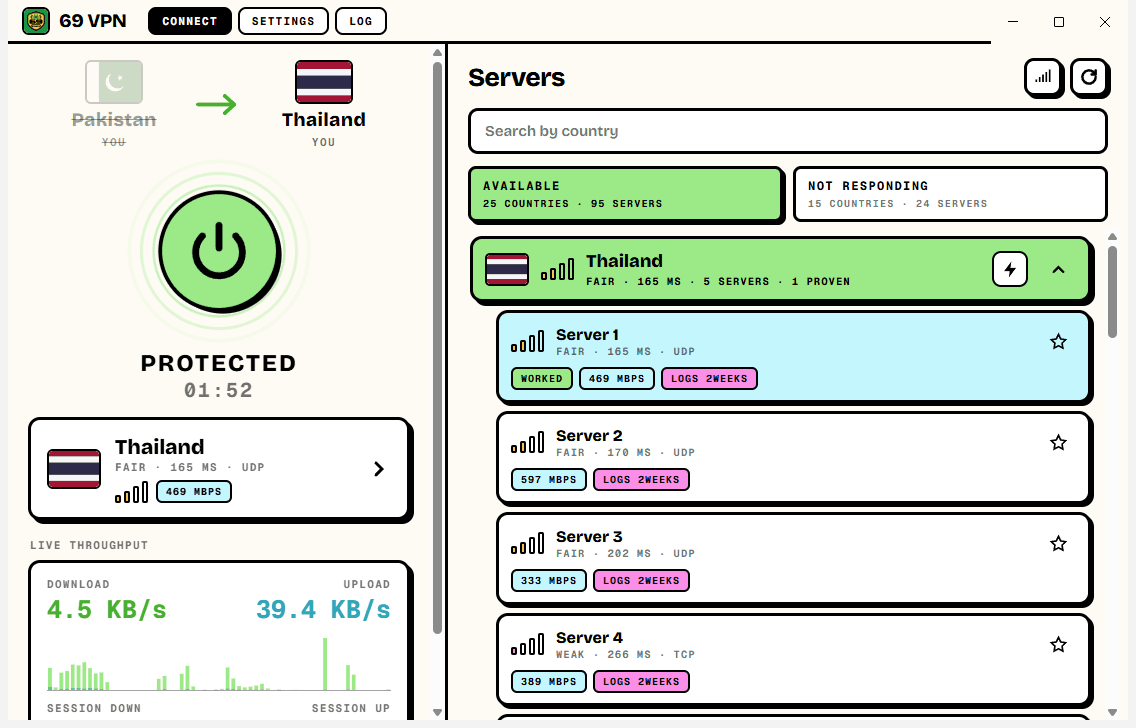
Your real country sits on the left, the country you moved to on the right, and the old one is struck through the moment the tunnel is up. That check runs against the address the internet actually sees, before and after, so the change is something you read rather than something you are asked to believe.
- Quick connect picks the best server; or click any country
- Before-and-after location, checked on every connect and every switch
- Live download and upload speed, measured on the tunnel itself
- Session timer and session totals
Servers
Only the countries that answer.
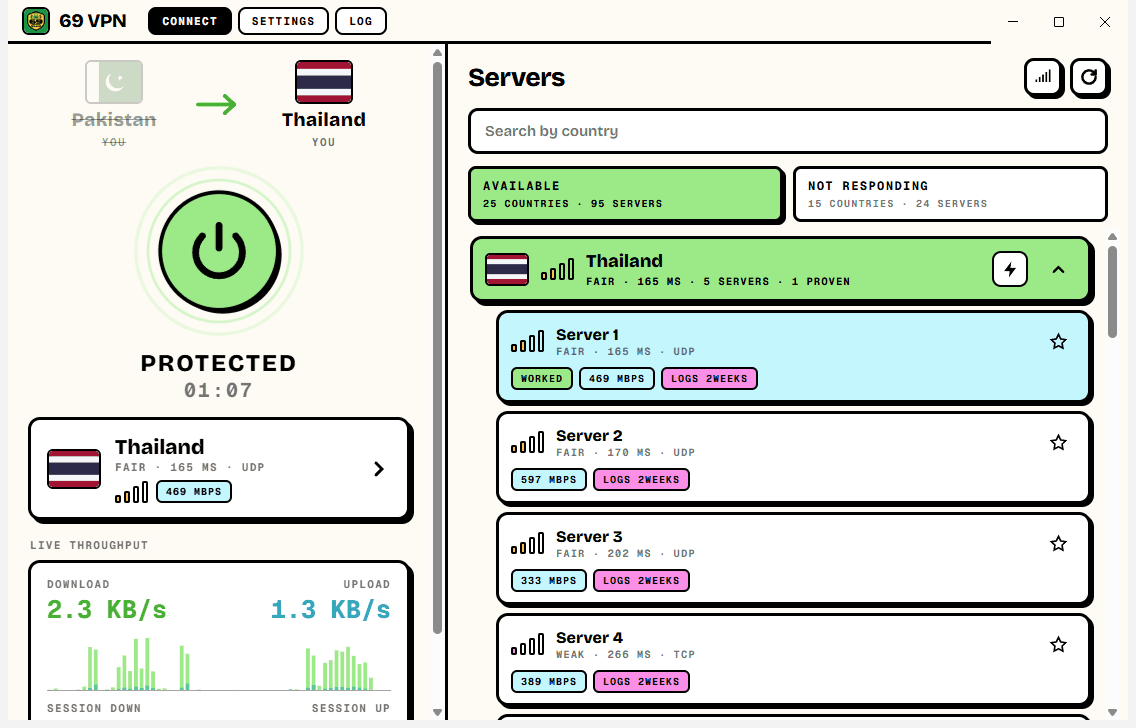
A free server list is mostly dead servers. 69 VPN tests every one from your own PC — the opening handshake of a real VPN session, not a ping — and splits the list in two: countries answering right now, and countries that are not. It keeps re-testing while the list is open, so a country that comes back moves across by itself.
- Countries across Asia, Europe, the Americas and the Middle East
- Signal bars and a real millisecond figure on every country
- If a server fails, it moves to the next best one in the same country
- Import your own .ovpn profile to use a server you control
Protection
A kill switch that is actually there.
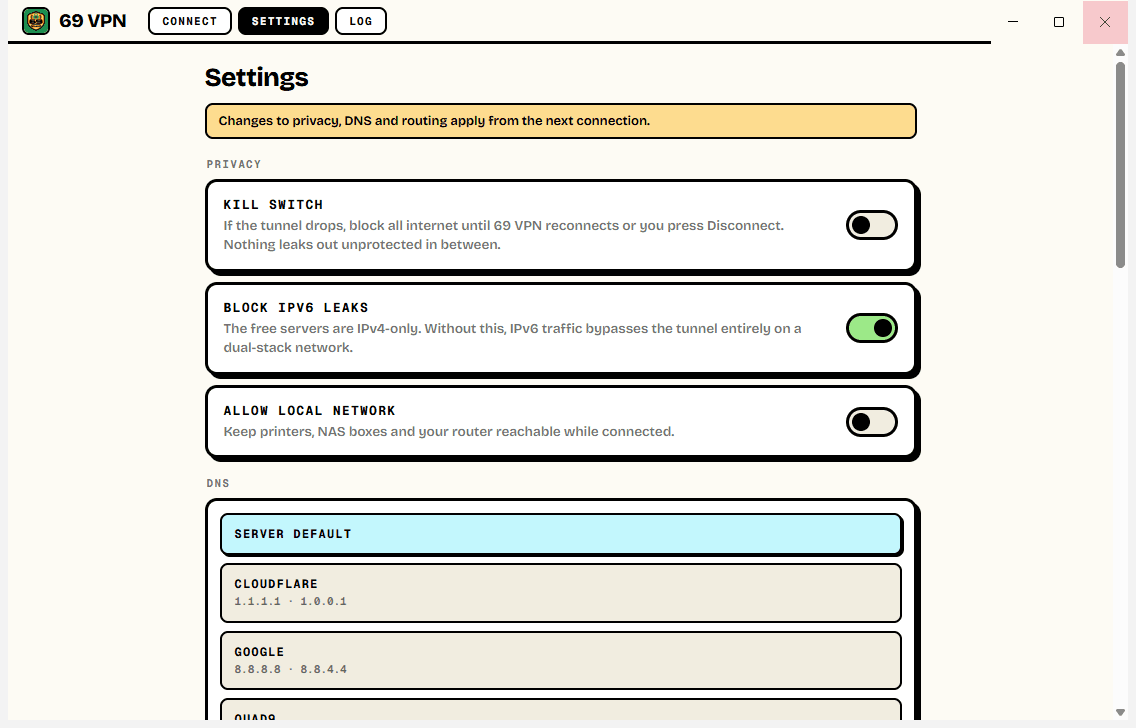
On Windows the kill switch is built in. If the tunnel drops, 69 VPN blocks the internet at the Windows firewall level until it reconnects or you press Disconnect, so nothing slips out unprotected in between. IPv6 — the hole that quietly bypasses most free VPNs — is blocked while you are connected, and DNS requests are kept inside the tunnel.
- Kill switch using the Windows Filtering Platform
- IPv6 leak blocking and DNS leak protection, on by default
- DNS override: Cloudflare, Google, Quad9, or AdGuard to strip ads
- Split tunnelling by site or address, and a local-network bypass
Honesty
The part other free VPNs leave out.
69 VPN owns no servers. It connects you to free, publicly listed relays run by volunteers and donation-funded operators — that is why there is nothing to bill you for, and it also means most of those operators keep connection records for around two weeks. 69 VPN shows each server's declared policy, and does not claim a no-logs promise it has no way to keep.
- No account, no email, no trial and no data cap
- No advertising, no analytics and no tracking
- Each server's declared logging shown on its row
- What it is and is not good for, said plainly in the policy
0
Accounts
no sign-up, no email, no trial
0
Data cap
no cap, no timer, no queue
1
Admin prompt
at install, never again
Ready to try 69 VPN for Windows?
Free. No account, no time limit, no data cap. Updates itself.
A look inside 69 VPN for Windows.
Proof it moved you
Only the ones that answer
The controls a paid client has
Everything you need.
The rest of what 69 VPN for Windows does.
Kill switch
If the tunnel drops, the internet is blocked until it is back. Nothing leaks in between.
Leak blocking
IPv6 and DNS are kept from slipping around the tunnel, on by default.
Proof it moved you
The address the internet sees, before and after, side by side.
Lives in the tray
Close the window and it stays connected. Start with Windows if you like.
Fails over by itself
Free relays vanish without warning; 69 VPN moves to the next best server in your country.
Always the latest
New versions install themselves, checked against GitHub's published checksum first.
Common questions.
Everything you need to know about 69 VPN for Windows.
Is 69 VPN for Windows really free?
Yes. There is no account, no trial, no data cap and nothing to buy. It connects to free, publicly listed relays run by volunteers and donation-funded operators, which is why there is nothing to bill you for.
Why does the installer ask for administrator permission?
A VPN has to create a network adapter, change routes and hold firewall rules, and Windows only lets administrators do that. So the installer asks once. It sets up a small Windows service that does those privileged jobs, which means 69 VPN itself runs as a normal program and never asks again — not when you connect, and not when it updates.
Windows showed a blue “Windows protected your PC” screen. Is it safe?
That is SmartScreen, which Windows shows for new software from a small publisher it has not seen many downloads of yet. Click More info, then Run anyway. The installer is checked by dozens of antivirus engines on VirusTotal — the result is shown on this page — and 69 VPN only ever installs an update whose checksum matches the one GitHub publishes for it.
What does the installer put on my PC?
The 69 VPN program, the official OpenVPN engine and its network driver from OpenVPN Inc. (skipped if you already have a recent OpenVPN), a network adapter named 69 VPN, and the 69 VPN Service. Uninstalling from Windows Settings removes all of it.
How does the kill switch work?
Turn it on in Settings. If the tunnel drops without you asking, 69 VPN blocks internet traffic through the Windows Filtering Platform until it reconnects or you press Disconnect. The rules only exist while the service is holding them, so they can never outlive it and leave your PC stuck offline.
Does it keep logs?
69 VPN itself collects nothing — no analytics, no account, no servers of ours. But the relays belong to their operators, and most of them declare that they keep connection records for around two weeks. The program shows each server's declared policy. For anything sensitive, import the .ovpn profile of a server you control.
Can I choose which apps use the VPN?
Windows has no per-app routing without a kernel driver, so 69 VPN splits by destination instead: send only certain sites or addresses through the VPN, or let certain ones bypass it. Your local network can bypass it too, so printers and file shares keep working.
Is there a phone version?
Yes — 69 VPN started on Android, with the same server testing, the same before-and-after location check, and per-app split tunnelling.

Get 69 VPN for Windows today.
Free. No account, no time limit, no data cap. Updates itself.
Version 1.0.1 · Windows 10 & 11
Counting visitors…
Reviews & suggestions.
Used 69 VPN for Windows? Rate it, and tell us what to add or fix — we read every one.
Loading reviews…
Be the first to rate 69 VPN for Windows.